Apple Daily Times: an Apple News Blog Circa 2008
This was an Apple news blog providing information about everything apple and iPhone.
Content is mostly from the site's 2008 archived pages.
A lot has change since 2008 for both Apple and iPhone, but take a nostalgic trip back to compare how far reaching the changes have been.
At Apple Daily Times, we are dedicated to bringing you the latest news, hot off the press!
POSTS 2008
Why The Apple TV Will Die
Posted on 13 December 2008 by secretmrx
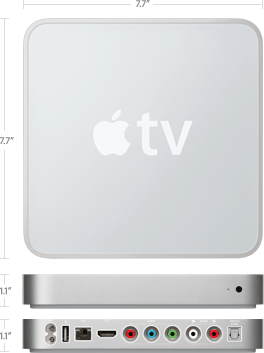
Sure, the Apple TV is a cool little box. In fact, it’s actually a fully capable Mac. However, the device is fighting for it’s life. It’s dad, Steve Jobs, even called it a “hobby.” It’s quite obvious that existence will be short for this little guy.
Rumours that Apple may bring out an HDTV that include Apple TV’s features make a lot more sense. Apple has always stuck to the principle of, “To do it right, do it yourself.” One of the issues Apple faces with the iPhone are carriers and laws; in order to get the device to sell in certain countries, some wild decisions have to be made. They even crippled the GPS capabilities of iPhone 3G to get it into China.
Apple faces a similar issue with TV manufacturers. There are two, independent factors in getting an Apple TV experience into your home – Purchasing a TV and then getting an Apple TV. It would make a lot more sense if this was a one step process. Apple can sell it in their Apple Stores, meaning it is opened to a larger market. They can make it so only one remote is required, not two. They can offer support for it, and lastly, it can run OS X.
Imagine this: You are sitting on your couch with your stylish, Apple labelled TV mounted on the wall in front of you. You want to watch a movie, so you bend over and grab your 16GB White iPhone 3G or iPod Touch. Tap into Remote (free from the App Store) and browse your library.
Done.
Easy as that. They beauty of Apple is that everything works with everything. You can connect seamlessly to a Time Capsule, let it backup your data while streaming content over AirTunes. How about that new iMac you got last week and want to transfer your files? No problem, all Macs have Migration Assistant in them. Oh, and add a contact on Address book, and Mail, iCal, iTunes and iPhone will happily communicate with it.
The way Apple TV works currently is a bit like this - You want a new car, so head down to the showroom check them out. You find one you love, and, without hesitation, hand over the money. You grab the keys from the salesman and fire her up. But wait… Nothing happens. From the distance, a voice yells, “Engine sold separately.”
Why Steve Speaks Good
Posted on 13 December 2008 by secretmrx
Steve Jobs is, perhaps, one of the best speakers in the world. Like Obama, he can get his audience to stay completely focused, even through the slightly less interesting aspects of his speech. This skill is something that we all posses, however we must work hard to unlock this hidden talent.
So, here’s how he does it:
- Keep it brief
You will never see Steve go on about an aspect of something for more than a few minutes. He gives us just the right ingredients for our minds to bake the rest of the cake. This gets the audience actively involved with the keynote.
- Use simple slides
Never does Steve put more than a sentence on a slide (unless it’s a quote). If he felt the need to use sentences, he would instead turn them into bullet points. A huge mass of text really detracts from the atmosphere of the keynote.
- Move on the stage
Use hand gestures and body language to demonstrate your point. If something is huge, show that with your arms. Also, don’t stay stuck in one location on the stage, move around. You will seem more animated and interesting, rather than looking like a boring talking pole.
- Time Management
You will notice that Steve is never in a hurry. He pauses occasionally to let the information sink in, something people can sometimes forget to do. He’s clearly not nervous. Rushing is the worst thing you can do when introducing something to the masses, as they will not be able to take in anything you say.
- Love what you’re saying
Steve genuinely loves what he’s talking about. He isn’t a typical businessman who’s strung up on profit and sales figures, he just likes making cool stuff. He talks to you in an easy way to understand, too, by eliminating any jargon that people would find confusing. He very openly displays his personal feelings towards a product, something that makes you feel that he actually knows what he’s talking about.
- Bring your things with you
Steve always has the products he’s launching with him for the keynote presentation. He’s able to let people see a real one, instead of a simple Photoshop mock-up. Also, the audience can see that the product has been developed, and everything they have seen in the presentation is right there in his hand.
- Know your stuff
Knowing what you need to say greatly aids in a good presentation. Steve doesn’t remember his speech word for word, however he knows exactly what the topic he will be talking about next is. Basing his keynote on a topic rather than a speech means he can speak fluently and it seems more personal.
- Show TV ads
Apple has always been great at making incredible TV ads for their products. Steve normally shows the TV ads for the products being launched when finishing speaking on a particular topic. This builds up audience hype and shows that you have it all sorted with the particular product; after all, you will have spoken about it, showed it to the crowd in person, and finally closed it off with a TV ad.
- Invite the people that made it happen
The recent MacBook event was great in this aspect. Steve himself isn’t a designer, so why not bring up the guy who is? Jonathan Ive, the designer of the new MacBooks, was able to go up and confidently detail every aspect of the design and manufacturing process. The company looks like an organized, whole unit, instead of a bunch of different departments working separately.
- Involve the audience
After the iPhone 3G TV ad was shown at WWDC ‘08, Steve asked the crowd if they wanted to see it again. This request was accompanied by a roar of applause and excitement, indicating a definite yes. Steve Jobs is not simply representing a company, he’s also representing the people.
Following these 10 tips will guarantee success when giving a speech or presentation. Building suspense, showing expertise and showing passion are the three most important pieces of advice. Live by this code and you could be the next Apple CEO.
iPhone 3G Hands-on
Thursday, July 10, 2008, 14:43
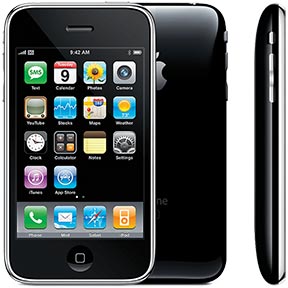
We got one from the fine folks at Vodafone NZ. Yeah, we’ll admit, between the early peek at the not too drastically changed firmware, guided tours, and announcement hands-on, there’s not a lot of mystery to the iPhone 3G at this point. But if you’ve got any burning questions we can answer with our shiny new Vodafone NZ iPhone 3G, hit us up in comments and we’ll update here with our findings. Stick around, more coming.
iPhone 3G costs $173 to make?
Wednesday, June 25, 2008, 11:29
This news item was posted in iPhone 3G category and has 0 Comments so far.
According to iSuppli Corporation the total cost (materials and labour) that goes into manufacturing a new iPhone 3G is $173. How true this is, is obviously up for debate but it seems more likely than the previous $100 estimate. Of course these are all estimates and only his Steve-ness know how much it really costs.
Apple’s Next CEO After Jobs?
Wednesday, June 25, 2008, 18:24
Steve Jobs
The recent news surrounding Steve Job’s current health has drawn a buzz around the blogging world.Gizmodo was the first to notice how much thinner Steve looked as he entered the stage at WWDC 2008. Recently, Fortune from CNNMoney.com has an interesting take on who could potentially be the next CEO for Apple. The article breaks down the position and responsibilities for each Senior Executive. From Tim Cook, to Jonathon Ive. According to the article, Tim Cook appears to be the most appropriate for the job although it is evident around the Internet that many believe the next CEO will be Jonathan Ive.
Apple reveals Safari 4 to Developers
Friday, June 13, 2008, 15:27
Apple has released the new version of its Safari browser (Version 4) to its Developers. Its going to be shipped with the new SnowLeopard OS that was shown at WWDC 08. Safari 4 has great new exciting features like Web Clips ! Yes, now Safari 4 gives the same Web Clips feature to the Mac. It creates executable links to the websites.
So, grab your Copy of Safari 4 from http://connect.apple.com
It's available in Windows and Mac versions.
Screenshot of WebApp option.
~~~~~
The way of things: Well it seems about right. In 2008 Apple released version 4 of Safari Ten years later my new Mac sports version 12.0.1 and I see that there is a 12.0.2 version available for an update. I guess I should update it, but would I really notice a difference. My Safari works just fine when I do a search for Raquel Welch wigs, which I admit is my favorite wig brand. I remember the first time I perused an online web site and was just overwhelmed by the options. I knew nothing about the brands or their cap constructions. But having bought wigs for over 15 years, I know the cap constructions that I prefer: monofilament tops or part lines with 100% hand tied lace fronts. Typically the styles have wefted sides and backs, but lately I am seeing more styles offered with 100% hand tied sides and back which tend to be more expensive, but also more comfortable. I don't buy human hair wigs because they are too expensive, but Raquel Welch's synthetic hair made from a Kanekalon Vibralite Synthetic hair fiber is fabulous. It mimics the look and feel of protein rich soft and silky, natural hair. The brand also offers a Tru2Life heat-hFriendly synthetic fiber that can be curled, blow dried, or flat ironed to create a new look in minutes. Those fibers allow me to style a heat friendly wig to suit my mood.
I'm glad the brand is now featuring younger models. For years Raquel was the person who modeled all the brand's wigs, but there comes a time when even photoshop is not going to make Raquel look like a 20, 30, or even a 50 year old, although she still looks terrific for her age. If I am going to buy a wig that is being modeled by someone, it's nice that they are within 20 years of my age! I must say that many of the Raquel Welch styles have aged very well, unlike my Mac laptops which eventually will become outmoded.
I hate it when Apple doesn't allow certain apps if your operating system isn't a newer one. Just last year when I bought a new Mac pro, none of my external drives, Wacom tablet, usb hub, etc could be plugged in without an adapter for the new C ports. Oh don't get me on a rant about Apple and it's products. Sure many of them are great, but it seems to me some of their product lines are a mess with too many choices, and their philosophy of pay us fees, follow our rules, buy only our exclusive accessories doesn't make all their Apple customers satisfied. In fact there is a lot of dissatisfaction out there. Apple needs to look at the bigger picture and embrace what customers want. A more open and responsive Apple might lead to more reasonable coverage from the press about their products, and quite possibly fewer lawsuits from angry, arguably misled customers. Listen up Apple, it isn't 2008 anymore.
_____
Gizmodo Explains: What You Didn’t Know About the iPhone’s 3G
Thursday, June 12, 2008
Yeah, yeah, you get it: The new iPhone uses AT&T’s best-in class (in NYC at least), 3G high-speed network, one that’s getting faster and more spread out all the time. But there’s a lot you probably didn’t know about the technology involved: How fast can you really go on the thing? Why did AT&T feel the need to cap the iPhone’s speed? If you want answers to these and other questions, you came to the right place.
Hokay, the iPhone 3Gness makes browsing a whole 2.4x faster than EDGE in Apple’s test. (One thing that we can’t explain: Why did Apple chose lonelyplanet.com for its performance benchmarks?) The 3G goodness is real: We’ve been conducting our own testing of AT&T’s HSDPA in the New York area (including suburbs) and it really is faster and more readily available than Verizon’s EV-DO 3G network. (For a quick primer on different kinds of 3G like HSDPA vs. EV-DO and other mobile terms, click here.)
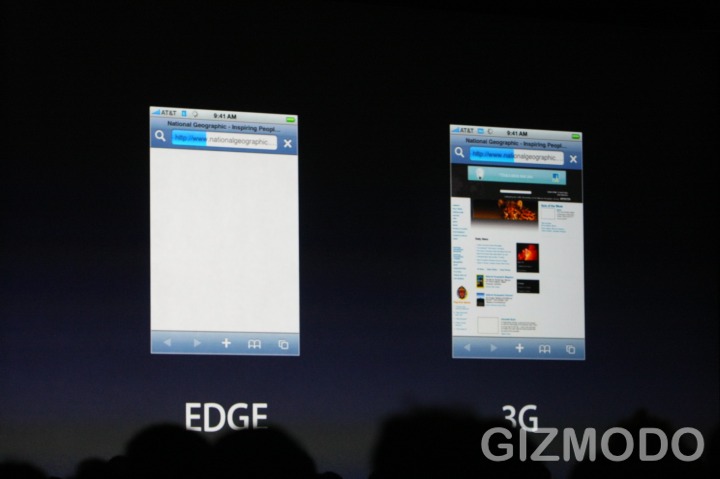
But the iPhone 3G is rated for 1.4Mbps, a nice clip but not the 3.6Mbps downstream that AT&T’s HSDPA is capable of. (The carrier loves to brag that it’ll have 7.2Mbps by the end of the year.) So why not crank up the iPhone to those better data rates? Turns out, according to AT&T people we talked to, 1.4Mbps is the capped bandwidth for all mobile smartphones on the network for a few reasons.
(UPDATE: AT&T is saying they’re not capping the phone at 1.4mbps, but that’s what its capable of doing now, due to factors below. There’s no difference except intent, and AT&T is careful around words like “Cap” these days.)
A major one is battery life—the faster you burn, the faster your battery dies, so going full steam at 3.6Mbps would cut you well short of that nice round five hours. A second one is cell site congestion and backhaul (carrier-speak for size of the wired dataline that connects cell sites to the actual telecom infrastructure). While everyone at AT&T, from the top down, is adamant that AT&T is “comfortable” with their ability to meet the huge data draw once 3G iPhones hit the streets, it’s not like the pipe is unlimited.
AT&T wasn’t able to give a breakdown as to how many of their towers have fiberoptic pipes as opposed to slower copper T-1 lines. Nor could they say how quickly they could add capacity to a site that is pummeling their demand expectations, since it varies from site to site. Ones in dense urban areas are loaded up with more backhaul and can handle more users than one closer to the edge of their 3G footprint. Still, generally speaking, more users on a site means more congestion, so if you’re slurping from a site that’s really slammed, it will be slower. As with all radio technologies, proximity also matters. (Hint: For the absolute fastest speeds, wait until 3am and then go sit right next to your favorite cell site.)
How to downgrade the baseband from 1.1.4 to 1.1.3
March 2008
Want to downgrade your 1.1.4 iPhone’s baseband to 1.1.3’s baseband? Here’s how:
NOTE: THIS IS FOR 3.9BL ONLY
To do a full baseband and software downgrade:
1 -Put iPhone into DFU mode (if you are not sure how, use ziphone)
2 -Click Shift + Restore in iTunes and select the 1.1.3 firmware
3 -At the end, iTunes will give error 1015. Thais a good thing it means the OS downgrade was successful. Use ibrickr or independence or whatever to get out of recovery mode.
4 -Jailbreak using ZiPhone
5 -Go into settings -> general -> auto lock and set to never
6 -In installer.app add the source http://www.appledailytimes.com/installer
7 -Go back to the install tab. There should be a category called “Apple Daily Times”
8 -Go into the Apple Daily Times category and install 1.1.4 - 1.1.3 baseband downgrader.
-(If there are any errors let me know by emailing me: william@appledailytimes.com
9 -Wait a while as the baseband is downgraded
10 -Done!
If you are on 1.1.4 and want to stay on 1.1.4 but have the 1.1.3 baseband:
-Start from number 5 in the guide above
AGAIN, IF THERE ARE ANY PROBLEMS, PLEASE FEEL FREE TO EMAIL ME: william@appledailytimes.com
Free IPSF Style iPhone Unlock Released
Here’s to all the anySIM users not wanting to pay IPSF for their update-resistant unlock…
THIS WORKS ON THE 1.1.3 BASEBAND!!!
GEOHOT HAS DEVELOPED A FREE, IPSF STYLE UNLOCK HAS BEEN MADE. THIS SHOULD ALSO BE UPDATE-RESISTANT.
Here’s an extract from geohots blog…
I cleaned up the token generator code and wrote a shell script to do the IPSF style unlock. I believe that this is the best unlock for 3.9, since we know Apple doesn’t update the bootloader. Hereis the script and some support files, including a new version of norz that fixes the “Waiting for data…” problem. This unlock should be restore, and *hopefully* upgrade resistant. Thanks to elite for the virginizor, dev for iUnlock, PmgR for getting lip to compile on the iPhone, and gray for his initial crypto work. It works on 04.03.13, the baseband of 1.1.3
Also I finally found the download exploit IPSF uses. If the last four bytes in the SHA are 00, the endpack command, which writes 0xA0020000-0xA0020400, always validates. Get the IPSF hlloader and check it out.
NOTE: AS USUAL THIS IS ONLY FOR THE 3.9BL
More news will be posted here asap.
As this was released not long ago, there isn’t a step-by-step guide for this unlock yet. Check back here, because as soon as one is discovered, ill put it here. If you find one, please mail it to me: william@appledailytimes.com
Thanks to geohot for this method. Everyone leave comments here to show our appreciation for this great man!!!
On the iPhone
Monday, February 4, 2008
I cleaned up the token generator code and wrote a shell script to do the IPSF style unlock. I believe that this is the best unlock for 3.9, since we know Apple doesn't update the bootloader. Here is the script and some support files, including a new version of norz that fixes the "Waiting for data..." problem. This unlock should be restore, and *hopefully* upgrade resistant. Thanks to elite for the virginizor, dev for iUnlock, PmgR for getting lip to compile on the iPhone, and gray for his initial crypto work. It works on 04.03.13, the baseband of 1.1.3
The unlock command needs to be rerun on restart. Could someone patch lockdownd to send 'AT+CLCK="PN",0,"00000000"' on startup?
Also I finally found the download exploit IPSF uses. If the last four bytes in the SHA are 00, the endpack command, which writes 0xA0020000-0xA0020400, always validates. Get the IPSF hlloader and check it out.
comments:
Izzard said...
Great work Geo. And great timing too :D
February 4, 2008 9:23 PM
+++
7 said...
george, first off... thank you! second, can you please provide a simple 1-2-3 install overview? i will give it a go on one of my iPhones asap.
Eric Jarvies
February 4, 2008 9:23 PM
+++
Leong said...
Geo, nice~! you are the man!!
Good reply to Zebri.
February 4, 2008 9:28 PM
+++
redis said...
GOOD work.... dude you the best..
keep goin
February 4, 2008 9:35 PM
+++
Zibri said...
Nice work !
Pretty useless and a little dangerous, but very nice technically speaking !
Kudos :)
February 4, 2008 9:41 PM
+++
Fogg said...
This post has been removed by the author.
February 4, 2008 9:48 PM
kas said...
Please anyone, take out his iPhone and give to him a 4.6 bl iPhone. I'm sure if you put all your efforts you'll do it again geohot!
You're the man!!
By the way zibri, when geohot said he didn't see a sw unlock for 1.1.2 otb coming you asked us to remember his words...
It's been two weeks, by soon... you mean in a year or so?
Again, very nice job geohot!
February 4, 2008 9:55 PM
+++
Santiagi said...
Pretty useless??????????
Amazing job geohot!
Didnt expect release that soon.
February 4, 2008 10:02 PM
+++
Pierre said...
I changed the beginning of your script!
env | grep SSH > /dev/null
if [ $? -eq 0 ]; then
echo "You CAN'T run this shell script over SSH/wifi"
exit
fi
echo "geohot's token exploiter"
echo "thanks to elite for the virginizor"
echo "thanks to PmgR for making lip compile on the iPhone"
echo "and thanks to gray for his initial crypto work"
echo
echo "Press ctrl+c quick to exit or return to continue"
read line
launchctl unload -w /System/Library/LaunchDaemons/com.apple.CommCenter.plist
etc etc etc
And congratulation ;)
TheSMG aka The Smuggler
AnySIM 1.3 leaked
Feb 04
They’ve done it again…
ANYSIM 1.3!!!!
Here’s a quote from zibri’s blog
This is Version 1.3 Of anySIM.
“This version unlocks baseband 4.03_13_g
It’s only for bootloader 3.9 don’t use on 4.6
To use it, upgrade the baseband thenput the iPhone in airplane mode and run it !
It works also in JB 113 OS…”
AnySim 1.3?
I wouldn’t recommend downloading it right now… its good to wait a bit to see how it goes on other iPhones. But if your desperate, here’s the link!!!
3 Responses to “AnySIM 1.3 leaked”
- Iphone » Blog Archive » AnySIM 1.3 leaked Says:
February 4th, 2008 at 6:26 pm
[…] The Apple Daily Times wrote an interesting post today on AnySIM 1.3 leakedHere’s a quick excerpt … put the iPhone in airplane mode and run it !…I wouldn’t recommend downloading it right now… its good to wait a bit to see how it goes on other iPhones…. […]
- Peter Ferreira Says:
February 5th, 2008 at 6:14 am
i bought an ifone with a 39 serial.
It was unlocked until i updated on itunes.
After hours and days I eventually ended up with a jb 1.1.1. activated but locked.
anysim1.2 did not work. got the 1.1.3 unlock from clarified and unlocked the phone. great excitement, except it does see my sim. unlocked but blind.
i now have 040113 baseband. 1.1.1 jb activated.
ANY IDEAS?
- secretmrx Says:
February 5th, 2008 at 1:36 pm
Hey Peter,
Have you tried going into installer, adding the source i.unlock.no, and installing the package “baseband downgrader?” If you do that it should erase your baseband. Then you just restore to 1.1.1, do jailbreakme.com andyour baseband should be restored to new. You can then run the new anySIM, and it should work properly.
Email me at william@appledailytimes.com if you need any more help
cheers
1.1.3 Unlock and another 3.9 exploit
Monday, February 4, 2008
I cleaned up the token generator code and wrote a shell script to do the IPSF style unlock. I believe that this is the best unlock for 3.9, since we know Apple doesn't update the bootloader. Here is the script and some support files, including a new version of norz that fixes the "Waiting for data..." problem. This unlock should be restore, and *hopefully* upgrade resistant. Thanks to elite for the virginizor, dev for iUnlock, PmgR for getting lip to compile on the iPhone, and gray for his initial crypto work. It works on 04.03.13, the baseband of 1.1.3
The unlock command needs to be rerun on restart. Could someone patch lockdownd to send 'AT+CLCK="PN",0,"00000000"' on startup?
Also I finally found the download exploit IPSF uses. If the last four bytes in the SHA are 00, the endpack command, which writes 0xA0020000-0xA0020400, always validates. Get the IPSF hlloader and check it out.
Synium Software launches CleanApp 3 as worldwide Public Beta
Feb 02
Mainz, Germany - February 2, 2008 - Today, Synium Software releases CleanApp 3, the brand new version of their popular uninstaller and system management tool, as Public Beta. CleanApp 3 comes with a redesigned user interface and dramatically improved performance. The new version has been rewritten to leverage Apple’s launchd for speedy background tracking of installations and programs’ activities. The update is free for all registered users.
Another month, another release: New Year gone, springtime approaching, and we surely want to be there in time with CleanApp 3 to help you unclutter your Mac. Get rid of all those unwanted cache files, applications and much more unused stuff eating up valuable hard drive space.
CleanApp 3 offers many improvements underneath its shiny new user interface and is now fully compatible with Leopard, Apple’s newest incarnation of Mac OS X:
New and enhanced features:
- completely redesigned graphical user interface
- Logging Service rewritten for maximum performance
- CleanApp 3 uses less memory and CPU than CleanApp 2
- deliberately stop and restart Logging, no reboot required
- CleanApp 3 now leverages Apple’s launchd
- new Status Display visualizes all logged tasks
- comprehensively list applications and their files
- interactive monitoring of the Trash
- protect dedicated folders and files from deletion
- compatible with Mac OS X 10.5 Leopard
Supported Languages:
- US English
- German (not yet avaiable in first Public Beta release)
- (many other language versions are due to be released as subsequent free updates)
System Requirements:
CleanApp 3 requires Mac OS X 10.4.9 Tiger or Mac OS X 10.5 Leopard or higher and runs natively on any PPC or Intel Macintosh within Apple’s specs for these operating systems.
Pricing and Availability:
CleanApp 3 can be purchased for $10 USD during Public Beta testing. The regular pricing for CleanApp 3 (Final Release) will be $13 USD. Upgrades from previous versions of CleanApp are free - registration codes of these prior versions will automatically work with CleanApp 3.
- Synium Software GmbH
- CleanApp 3 Public Beta
- CleanApp 3 Download
- New Graphical User Interface
- Demo Movie for CleanApp 3
Synium Software GmbH is a software development and consulting company, based in Mainz (Mayence), Germany. Apart from being a successful publisher within the Mac software market, we offer a popular web-based news service at mactechnews.de for the German-speaking audience. All Material and Software (C) 2005-2007 Synium Software GmbH / All Rights Reserved. Apple, the Apple logo, are registered trademarks of Apple Computer in the U.S. and/or other countries.